

You have been pairing with an agent for an hour. The first answers were sharp. Then it forgot the goal, reopened files you already ruled out, and replied as if your instructions had never existed. Nothing crashed. The session just got worse.
That slow decay is not bad luck. It is what happens when the context window fills with the wrong information — or too much of the right information. In my agent orchestration work, I learned this the hard way: the model did not get dumber. The context did.
AI is also writing more code, faster than most teams can review. Longer sessions, bigger diffs, and weaker human oversight all push more tokens into every turn. Without a deliberate way to manage that growth, product quality drops quickly — even when the model itself is strong.
The fix is not a longer prompt. It is context engineering: controlling what the agent sees on every turn. To get there, we need to answer three questions — why quality drops, what the context window actually is, and how to curate it.
How the context window works
What is a context window?
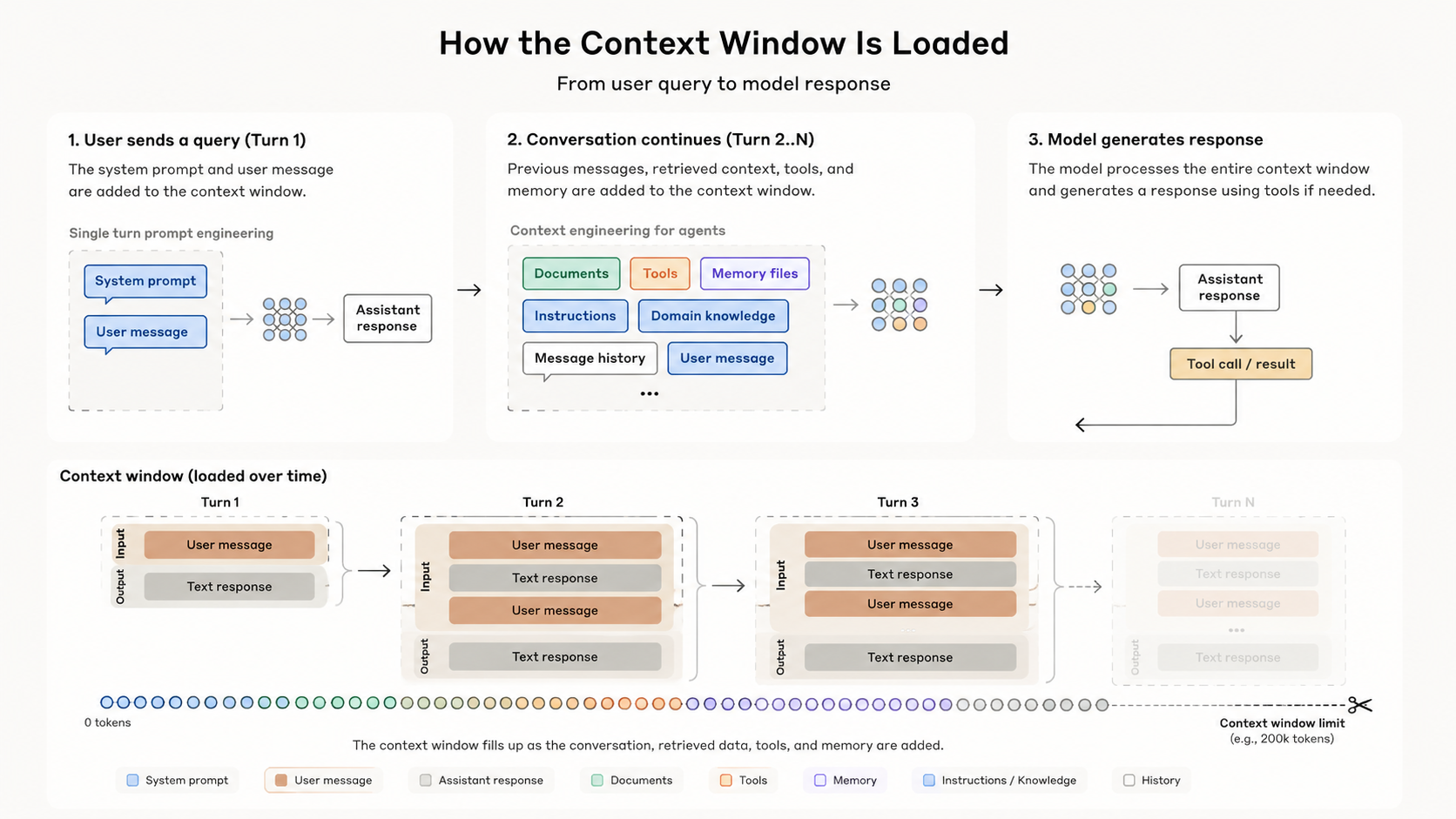
The “context window” refers to all the text a language model can reference when generating a response, including the response itself.
When you search on Google, each query stands alone. With an AI agent or ChatGPT, the experience feels like a conversation: you talk, it responds, and the next reply can build on what came before.
As an engineer, have you ever wondered how that works under the hood?
Every time you press Enter, the client sends the full message history to the server. The server turns that text into input tokens, the model processes them, and you get output tokens back. On the next turn, the cycle repeats — with everything that came before included again.
That design is powerful, but it is not free.
Why more context hurts quality
The window has a hard limit. An agent can only process a fixed number of tokens per request. Claude Sonnet 4.6 supports up to 1M tokens on the API, but most day-to-day sessions still run into practical limits long before that. When input grows too large, the system truncates old messages or compacts them into a summary. Details get dropped — sometimes the exact instruction you care about.
The model does not verify truth. It generates text from whatever is in the window. If the input is messy, full of boilerplate, wrong assumptions, or stale tool output, the agent will answer from that foundation. Bad context leads to bad output, even when the model is capable.
A bigger window does not remove the problem. Research on needle-in-a-haystack benchmarks uncovered context rot: as the number of tokens in the context window increases, the model’s ability to accurately recall information from that context decreases.
Models have an attention budget. Every new token competes for focus. A 200K or 1M token limit is not the same as 200K or 1M tokens of reliable memory.
Long sessions cost more. Providers charge per token. Because each turn resends the full history, a bloated session gets more expensive over time — not just slower.
What fills the context window?
Before you optimize, it helps to know what is already inside:
- System prompt — global, user, or project-level instructions loaded at session start.
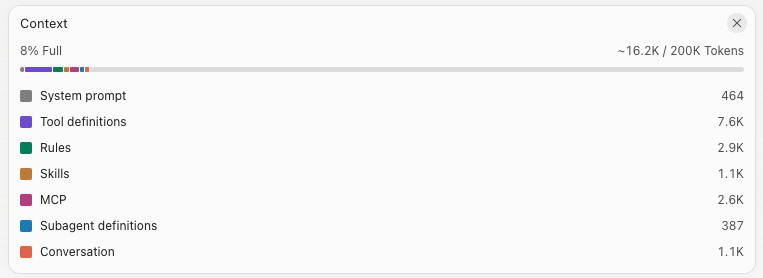
- Tools, MCPs, skills, and rules — when you start a new session, the agent loads the definitions for every tool and rule you enabled. More tools means more tokens consumed before you even ask your first question.
- User-agent conversation — every message, tool result, and file read along the way.
For example, here is a context window looks like when I just start a new conversation:
Context engineering
So what can we do to improve the agent’s output? Anthropic frames the answer as context engineering:
Context engineering refers to the set of strategies for curating and maintaining the optimal set of tokens (information) during LLM inference, including all the other information that may land there outside of the prompts.
In plain terms: right information, at the right time, in the right format, in the right amount.
Output Quality ≈ Model Quality × Context Quality
A strong model with weak context still produces weak results. Prompt engineering asks how to write better instructions. Context engineering asks what configuration of information — system prompt, tools, history, retrieved files — is most likely to produce the behavior you want across many turns.
Before adding anything new to a session, I ask three questions:
- Is this information needed right now?
- Can the agent load it later, only when it actually needs it?
- Could a subagent or a script handle this work instead of bloating the main window?
Ways to optimize
1. Manage your system prompt
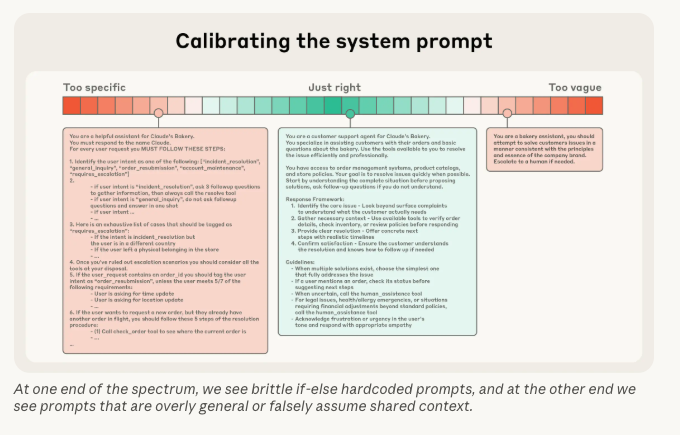
The system prompt often lives in files like CLAUDE.md, .cursor/rules, or AGENTS.md — at global, user, or project level. These instructions are typically re-sent on every turn, so they survive compaction better than old chat history.
That reliability is useful, but it also makes them expensive. A bloated system prompt eats attention budget from the first message to the last.
Keep system prompts minimal and durable. Capture project-wide conventions and guardrails. Move task-specific details into the conversation, memory files, or just-in-time retrieval — not into a rule file that loads on every session.
2. Start fresh
Do not use one session to solve unrelated intents. I separate refactors from features, exploration from implementation. Each intent gets its own session so the window starts clean instead of carrying irrelevant history.
When one session needs context from another, ask the agent to summarize the work in a structured format — decisions made, files touched, open questions — so the next session can pick up without replaying the entire transcript.
3. Point to the right resources explicitly
In a large codebase, discovery is expensive. The agent may read dozens of files before it finds the two that matter.
Point it directly:
1. Let's take a look at the @A.swift and @B.swift file, take them as reference to write the code.
2. Let's look at the @ViewController.swift and @ViewModel.swift. The issue is ...,
This is a form of progressive disclosure — give the agent a narrow path first, and let it pull more context only when the task demands it.
4. Use tools and scripts for deterministic work
For work with a fixed sequence of steps, a script beats a prompt.
The script runs in a separate process and returns a compact result. The agent’s window stays clean. No step-by-step reasoning tokens, no repeated instructions across turns.
I learned this on an agent orchestration project. At first, I used a prompt to handle project setup:
Set up the project by follow these steps:
- Clone the project
- Navigate to corresponding folder
- If iOS, run pod install. Else if Android, ...
It worked, but it was slow. The model spent tokens reasoning through steps that never needed reasoning. I replaced the prompt with a setup script. Speed improved, and the agent had more room left for the work that actually required judgment.
5. Leverage subagents
For long-running tasks, subagents help. Each subagent starts with a fresh context window, does the heavy exploration or implementation work, and returns only the final result to the main agent.
The main session keeps a high-level view. The subagent absorbs the noise.
6. Compact and rewind
I use Claude Code for daily development. Two commands matter most when a session starts to drift.
/compact
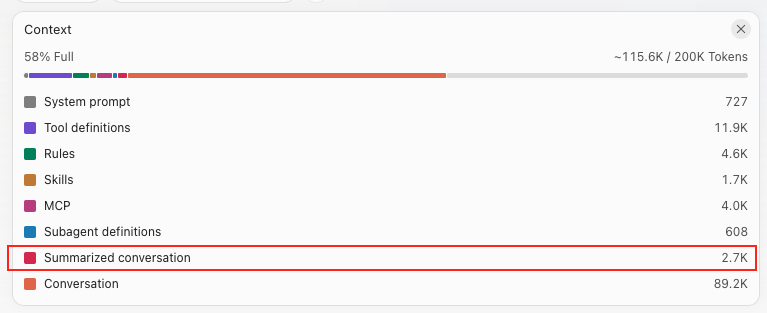
The /compact command triggers a summarization of your current conversation history. Instead of keeping every token of every message, Claude replaces the full conversation with a condensed summary that preserves the most important information.
Use it when the session is still on track but the history is getting long.
Note:
The LLM providers like Claude, Codex, … already provide the auto compact mechanism when the the context window hit the limit.
/rewind
When a message pushes the conversation in the wrong direction, /rewind rolls back conversation history, file changes, or both to an earlier checkpoint. You can also summarize from a chosen point to free space while keeping earlier context intact.
That removes wrong assumptions and dead-end exploration from the window before they compound. Note that /rewind tracks edits made through Claude’s own tools — changes from arbitrary shell commands may not be fully reversible.
7. Use memory files
Instead of making the agent rediscover the same facts every session, store durable knowledge in markdown files: business rules, architecture notes, testing conventions, and decisions that should survive across tasks.
The agent can read them just in time. You update them when reality changes. The session stays focused on the work at hand.
Conclusion
Agents are only as sharp as the context they carry. I still run long sessions, but I treat the context window like working memory on a small device — keep what matters, drop what does not, and start fresh when the intent changes.
If you are also experimenting with compaction, subagents, or memory files, I would love to hear what works for your team in the comments.